
Features > Transfer Security > SSH Public Key Authentication
Cerberus FTP Server
SSH SFTP Public Key Authentication
Cerberus FTP Server Professional and Enterprise editions can perform public key authentication for SFTP connections. When using public key authentication, Cerberus will verify that the signature presented by an SFTP client matches the public key associated with that user.

Multiple SSH Keys Per Authenticated User

Flexible Authentication Settings
How it Works
The Cerberus FTP Server User Manager allows each user to be configured with a required authentication method. The authentication method can be set to require:
- A password only (the default)
- A public key only
- Both a password and a public key
There is also an option for selecting a public key file when the authentication method for a user is set to public key or password and public key authentication. The public key file can be in SSH format (as defined in RFC 4716), OpenSSH v2 format, or from a PEM or DER encoded certificate.
Process Support – Multiple SSH Keys per Authenticated User
A single user can authenticate with more than one different SSH client key. This allows interactive or automated processes that share a common username and sign-on from several different machines to enjoy the benefits of multi-factor authentication without the hassle of key replication and coordination.
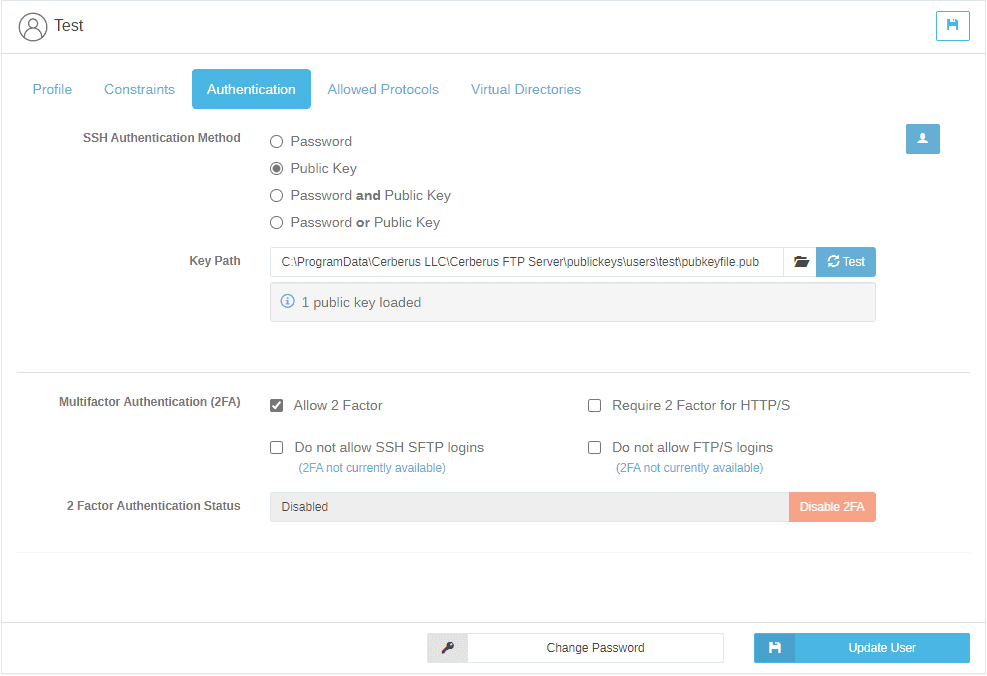
SSH Public Key Authentication Resources:
- How to configure a Cerberus FTP Server User for SSH Public Key Authentication
- SSH SFTP setup in Cerberus FTP Server
- Versions 12.4 and above support decoupling SSH keys from SSL/TLS keys
Try Cerberus FTP Server free for 25 days
- Live US-based phone & email support
- Bulletproof reliability
- Built for complete data control
- Trouble-free enterprise deployment
Full Cerberus FTP Server Feature List

Protocols
FTP, FTP/S, SFTP, SCP, HTTP/S

Advanced Security
SSH, SSL, FIPS 140-2

MFT Automation
Event, Alert & Sync Tools

Environments
Windows Server, Cloud & Virtual

Access Protection
IP, User & Protocol Restriction Tools

Account Management
AD, LDAP, 2FA, SSO & More

Auditing and Reporting
File Access, User and Admin Logging

Administration Tools
API, Sync Manager, & Other Tools

HTTPS Web Portal
Browser-Based Transfer from Any Device

Monitoring & Testing
Automated Network, Load and Access Testing

Regulatory Compliance
Auditing, Retention, & Encryption Tools
Award-Winning Support
Phone, Email, & 24/7/365
Industry-Focused Solutions
Cerberus FTP Server supports a wide range of industry and professional needs. Enhance data security, streamline operations, and ensure compliance with regulations.


Uncompromising Commitment To Customer Satisfaction

G2

4.8 / 5

Capterra
4.8 / 5

CNET Download
4.8 / 5
Recognized as an industry-leading secure FTP server








Trusted by Companies Like Yours
Uncompromising Customer Satisfaction

James Fayson
IT Service Owner, Duke Health Technology Solutions
Our users have found Cerberus to be straightforward. We have handled many service tickets over the past three years, and Cerberus has had the least number of issues, by far.

Jake Cloward
Support Manager, Companion Corporation
We’ve been using Cerberus for at least five years, and it’s been awesome. Everything’s been very simple and easy, and we haven’t come across any limitations. It always just seems to work.






Latest News
When secure file transfers aren’t so secure: Time to rethink “legacy” File Transfer with Serv-U
In the era of ever-increasing security challenges, organizations expect their secure file -transfer platforms to not only function reliably, but to lead in security. These file transfer solutions should use engineering best practices, proactive security evaluations,...

You pay the price when SFTP vendors cut corners
Learn more about how SFTP security depends on more than just encryption. Discover how ISO 27001 and SOC 2 Type II certifications reflect a real vendor commitment to secure file transfer.
SFTP vs. FTPS. Understanding the Difference.
Learn more about FTPS vs SFTP and which secure file transfer protocol fits your organization’s needs. Understand differences in security, compatibility, authentication and compliance.
Explore what Cerberus FTP Server can do for you
- 25 Day Free Trial
- No Credit Card Required
- Up and running in less than 15 mins